
Elephant Robotics Mercury Humanoid Robot B1 (4011300002)
In stock
- BRAND:
- ELEPHANT ROBOTICS
- PART #:
- 4011300002
- ORIGIN:
- China
- AVAILABILITY:
- SUBJECT TO AVAILABILITY
- SKU:
- Elephant-Robotics-4011300002
Elephant Robotics Mercury Humanoid Robot B1 (4011300002)
A successful robotics demonstration must connect what a machine perceives with what it does, rather than treating sensing and movement as separate exercises. Elephant Robotics Mercury Humanoid Robot B1 (4011300002) brings that connection into focus through articulated motion, onboard computing and interaction hardware. For a research group or teaching laboratory, the purchasing decision therefore extends beyond mechanical reach: it also concerns the software environment, the controller configuration and the way operators will develop and test behaviour. Mercury B1 offers a basis for that work, with distinct published controller listings that need to remain separate when preparing a project specification.
The product is available through this page, by quotation.
Background
Elephant Robotics and the Mercury series
Mercury B1 belongs to the Elephant Robotics Mercury series. The series supports ROS, Moveit, Gazebo and Mujoco, connecting the hardware discussion with software tools used in robotics development. These environments give buyers a useful starting point for evaluating a project workflow, but they do not replace a review of the particular software packages, interfaces and exercises required by the organisation.
In education and research, a humanoid platform can provide a common subject for work across motion planning, perception and operator interaction. That is useful when teams need to connect disciplines rather than evaluate an isolated component. The supplied evidence establishes the Mercury series software support and the B1 hardware specifications; it does not provide a company history or a complete application catalogue.
Motion, sensing and operator interaction
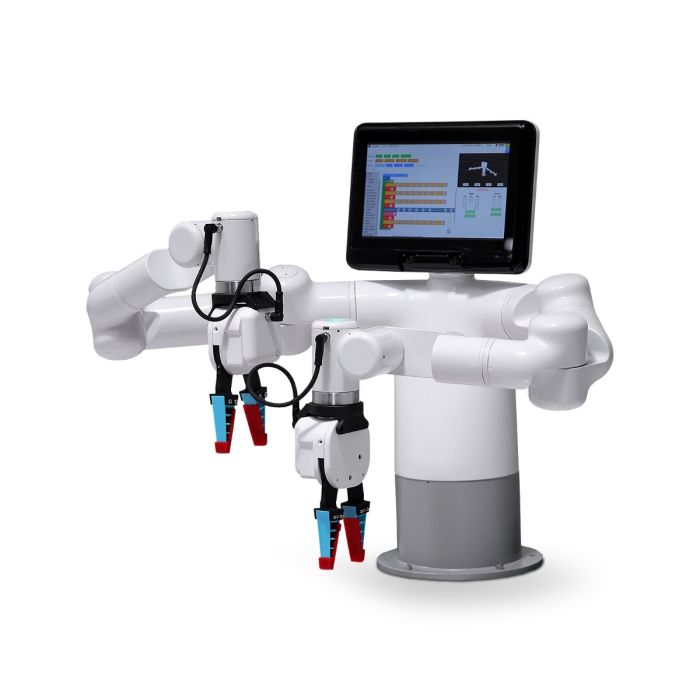
Mercury B1 has 17DOF, a Harmonic Reducer reduction mechanism and an Electromagnetic friction plate joint brake. Its interaction hardware includes a 9-inch Touching Screen, an Orbbec Deeyea 3D camera and a line array of 4 microphones with 5m 180° pickup. These are distinct parts of the platform that project teams can consider when designing motion and interaction experiments.
Paired with the myController S570 exoskeleton controller, Mercury B1 achieves 1:1 motion replication. This gives the control discussion another dimension alongside programmed operation. The pairing is a stated capability, not a declaration that the controller is included in the supplied package. A purchasing specification should distinguish the robot, the intended control method and the accessories required for the planned work.
Technical Specifications
| Specification | Mercury B1: manufacturer specifications page | Mercury B1: shop page | Mercury B1: alternative controller version |
|---|---|---|---|
| Product size | 200*192.5*537mm | — | — |
| Working voltage | 24V | — | — |
| Degrees of freedom | 17DOF | — | — |
| Maximum working radius | 450mm | — | — |
| Maximum payload | 1KG | — | — |
| Net weight | 8KG | — | — |
| Repeatability | ± 0.05mm | — | — |
| Computing power | 67 TOPS | — | — |
| Main controller CPU | 6-core NVIDIA Carmel Arm®v8.2 64-bit CPU 6MB L2 + 4MB L3 1.9GHz | — | — |
| Main controller GPU | 512 core NVIDIA Volta architecture GPU with 64 Tensor Cores,1100MHz | — | — |
| Screen | 9-inch Touching Screen | — | — |
| Microphone array | 4 microphones | — | — |
| I/O | 24V 6 Input, 6 Output | — | — |
Specifications are as published by the manufacturer and are confirmed against the datasheet at quotation.
The manufacturer has not published the battery capacity, operating time, IP rating, box contents, operating temperature or power consumption; these are confirmed at quotation.
The columns preserve the separate source listings; a dash indicates that no corresponding figure is supplied in the fact sheet for that listing. The listed materials are Carbon fiber, Aluminum alloy and Engineering plastics. Communication options are CAN Bus/WIFI/Network port/Bluetooth/USB serial port. These non-numerical specifications sit alongside the dimensional, electrical and computing figures above.
Why do Mercury B1 listings show different computing figures?
The manufacturer specifications page lists Mercury B1 with 67 TOPS and 8KG net weight. The shop page lists Mercury B1 with 21 TOPS and 11.2KG net weight. A Jetson Orin Nano 8GB version has 40 TOPS. Those values describe separate published listings and must not be combined into a single, apparently uniform configuration.
This distinction matters when preparing a research budget or an internal procurement document. A computing requirement should identify the intended controller configuration, rather than use the largest figure found across the listings. Likewise, installation planning should use the weight attached to the selected listing instead of treating the alternative value as interchangeable.
The detailed CPU and GPU specifications in the table belong to the manufacturer specifications page. They should not be transferred to the shop listing or the Jetson Orin Nano 8GB version. Request a quotation that identifies the controller and the corresponding datasheet, so that the technical evaluation and the purchasing documentation describe the same configuration.
Who is Mercury B1 for?
Mercury B1 is relevant to university laboratories, robotics educators and development teams evaluating humanoid motion and interaction. Its published 450mm maximum working radius and 1KG maximum payload provide concrete boundaries for screening proposed manipulation exercises. Teams should begin with the objects, movement paths and workspace required by their programme, then compare those requirements with the selected configuration.
For teaching, the combination of a physical platform and supported robotics software environments can help organise practical work around planning, visualisation and execution. For research, the camera, microphone array and screen provide hardware around which perception and interaction experiments can be designed. Neither use removes the need for supervision, suitable procedures and a task-specific risk assessment.
Organisations considering exhibitions or demonstrations should focus on the complete operating workflow, including how an operator starts, supervises and stops an activity. No sibling recommendation is made here because the supplied facts do not establish the comparative capabilities of the other models. Selection should follow the actual project requirements rather than the product names alone.
What is Mercury B1 used for?
- Robotics teaching: Structure practical exercises around articulated motion, control concepts and the relationship between software and hardware.
- Motion-planning research: Develop project workflows using the Mercury series support for ROS, Moveit, Gazebo and Mujoco.
- Perception experiments: Use the Orbbec Deeyea 3D camera as part of a planned sensing and robot-behaviour investigation.
- Human–robot interaction: Build supervised experiments around the touchscreen and microphone array.
- Exoskeleton control studies: Explore motion replication through pairing with the myController S570 exoskeleton controller.
- Controlled demonstrations: Present programmed robotics activities with tasks selected around the published working radius and payload.
Pricing and Availability
Request a quotation for the Mercury B1 configuration required by your organisation. Include the intended application, preferred controller listing, control method and any accessories needed for the project. This gives the technical discussion a clear scope and helps keep hardware selection separate from the software and integration work undertaken by the project team.
Delivery, customs and support are arranged with the quotation.
To begin the purchasing process, request a quotation for the product available on this page.
Frequently Asked Questions
What are the published reach and payload limits?
Mercury B1 has a maximum working radius of 450mm and a maximum payload of 1KG. Use both limits when assessing the intended objects and movement paths, rather than treating reach alone as evidence that a task fits.
Does Mercury B1 support ROS1 and ROS2?
Mercury B1 supports both ROS1 and ROS2 versions and provides RVIZ simulation environment support. The Mercury series also supports ROS, Moveit, Gazebo and Mujoco.
Which computing specification should I use?
Use the figure attached to the configuration being quoted: 67 TOPS for the manufacturer specifications-page listing, 21 TOPS for the shop-page listing, or 40 TOPS for the Jetson Orin Nano 8GB version. Keep the detailed controller specification with its original listing.
Can Mercury B1 replicate an operator's motion?
Paired with the myController S570 exoskeleton controller, it achieves 1:1 motion replication. Specify this control arrangement in the quotation request so that the required pairing is part of the procurement discussion.
What sensing and interaction hardware is listed?
The listed hardware comprises an Orbbec Deeyea 3D camera, a 9-inch Touching Screen and a line array of 4 microphones with 5m 180° pickup. Application design must still define how these components are used together.
What connections are available for integration?
The communication specification lists CAN Bus/WIFI/Network port/Bluetooth/USB serial port. The I/O specification is 24V 6 Input, 6 Output; integration planning should identify the signals and interfaces required by the surrounding equipment.
Where can I buy Mercury B1 and what does it cost?
The product is available through this page by quotation. Request a quotation identifying the required configuration, accessories and project requirements to establish the commercial scope.
Summary
Mercury B1 brings the relationship between perception, interaction and motion into a single platform evaluation. Its articulated structure, sensing hardware and software support give project teams specific elements to assess, while the differing weight and computing listings make configuration control essential. Start with the proposed task, keep every figure attached to its source listing and use the quotation to define the equipment required. For a procurement discussion grounded in those requirements, this page is the starting point.